Case-to-pallet search
Compare feasible pallet patterns against the actual platform, permitted case orientations, overhang, gaps, height, mass and operating constraints.
Free palletisation & logistics planning tool
LoadBlueprint connects product, case, pallet, stack, vehicle, cost and carbon assumptions in one browser-based study—so you can compare fit before physical trials and commercial commitments.

One connected model
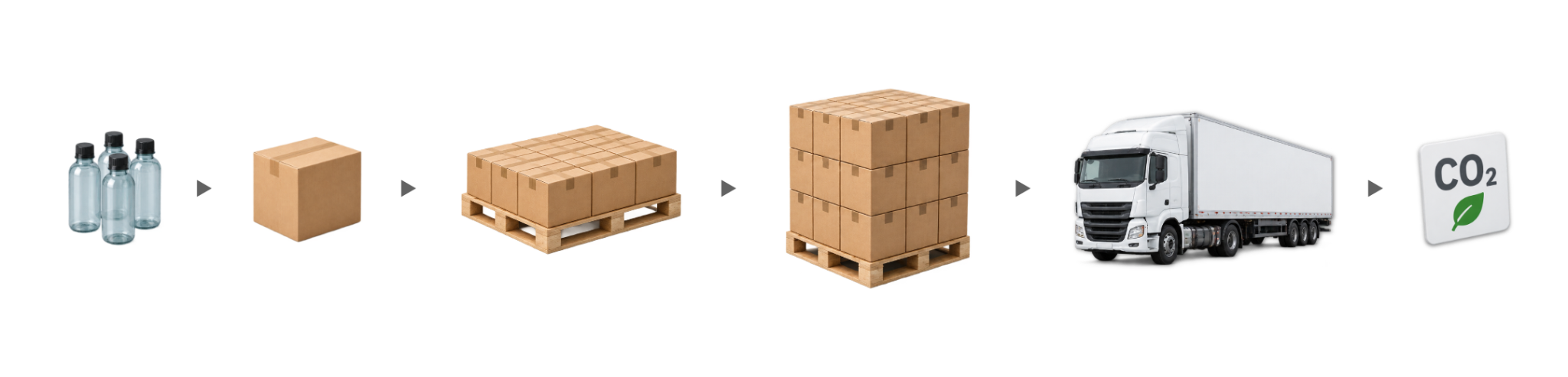
A pallet pattern alone is not a complete load plan. LoadBlueprint follows the decision from the primary pack through the shipping case, pallet and vehicle—while keeping commercial and carbon assumptions visible.
What it models
Use the modules you need. The tool can begin with a known case, a measured product or bundle, a transport question, or a full packaging-system study.
Compare feasible pallet patterns against the actual platform, permitted case orientations, overhang, gaps, height, mass and operating constraints.
Build candidate outer cases from measured packs or bundles, fit allowances, board caliper and simplified partition rules—then test each candidate through the live pallet model.
Review layer sequence, partial layers, interlayer placement, contact support and calculated load transfer, with an advisory compression check tied to a stated evidence basis.
Place the selected unit load into an editable vehicle or container profile and compare floor utilisation, payload utilisation and movements per year.
Screen permitted case-dimension changes and evaluate a private browser-based case library for consolidation opportunities under common pallet and transport constraints.
Add optional commercial inputs and bounded carbon factors, compare against a saved baseline, and produce a reviewable report with exports for further work.
Four starting points
Each workflow opens the same connected engine at a different point. You do not have to complete a full-system study to answer a focused question.
Start with a confirmed shipper and compare feasible pallet layouts and complete stacks.
Build candidate case envelopes around a measured primary pack or bundle, then palletise the result.
Carry the selected pallet into an editable vehicle or container floor and payload analysis.
Connect packaging, pallet, vehicle, commercial and carbon assumptions in one study.
How it works
LoadBlueprint does not hide the study behind a single score. Inputs, constraints, alternatives and assumptions remain available for review.
Begin with the case, product, transport plan or complete packaging system.
Use measured dimensions, mass, orientations, clearances, height and payload limits.
Inspect ranked patterns, case candidates, dimension changes or portfolio opportunities.
Check the visuals, constraint trace, evidence basis and exports before taking action.
What you receive
The selected result is shown from several angles, with the operating limits and modelling basis kept alongside it.
Who it is for
Use the tool directly, or use its output to create a clearer technical conversation before drawings, trials, quotes or freight assumptions become difficult to change.
Clear boundaries
The result is only as reliable as the dimensions, masses, constraints and evidence entered. Always confirm the finished commercial system under its real manufacturing, storage, handling and distribution conditions.
Frequently asked questions
Yes. The current public-beta tool is free to use and does not require an account. If optional paid services or advanced workflow features are introduced later, they will be separate and clearly identified.
You can start with a confirmed shipping case, a measured product or bundle, a transport-planning question, or a full packaging-system study. The workflow determines which sections open first, while the underlying model remains connected.
It can generate and compare simplified orthogonal product arrangements and case envelopes using the fit, board and partition allowances you enter. It does not create a production dieline, determine converted features, prove line compatibility or replace supplier engineering.
No. The compression module is an advisory screen using the evidence basis you select. It does not model every influence on real case performance, including moisture history, creep, scores, openings, handling damage, pallet deflection, product load-sharing, vibration or shock. Confirm the finished unit load with suitable specifications, testing and competent review.
No. It can compare the entered internal envelope, pallet clearance and payload limit and may provide contextual reference notes. Legal compliance depends on the current jurisdiction, route, vehicle, axle configuration, loading method and other conditions outside the model.
The working draft, saved comparison and case-library records are stored in your browser on the device you use. They are not account records. Exports occur only when you choose them. A shareable scenario link contains the scenario information in the link itself, so review it before sharing and do not enter confidential formulations, pricing or proprietary specifications.
Yes. You can switch the interface between metric and imperial units. The underlying calculation preserves a consistent internal basis while presenting the selected unit system.
Yes. You can print or save the report as a PDF, download the selected scenario as JSON, export case coordinates where available, and download CSV outputs from the case-design and case-library modules.
Start with the decision in front of you
Use measured information where you have it, keep assumptions visible where you do not, and treat the result as the beginning of technical review—not the end of it.
LoadBlueprint is provided by Circular Blueprint for general informational, educational and early-stage engineering-planning purposes. It does not provide legal, regulatory, safety, structural, transport or commercial approval and does not replace competent review, supplier confirmation or physical validation of the finished system.
Receive one concise monthly note on packaging change, compliance, palletisation and meaningful updates to Circular Blueprint’s free tools.
Receive the monthly note.
Approximately one email per month. Unsubscribe at any time. View our Privacy Policy.